Having trouble redeeming rewards, placing an order, or claiming points from a recent visit?
Please ensure you have the most updated version of our app! (App Version 4.2.17)
**Step 1: Open the Chicken Salad Chick App**
- Unlock your mobile device and locate the Chicken Salad Chick app icon. It's the one with the Chicken Salad Chick logo.
**Step 2: Access Your Profile**
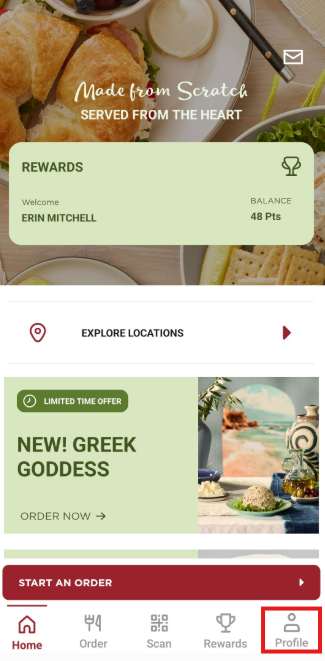
- Once you've opened the app, you'll typically find yourself on the home screen. To view your current app version, tap on the "Profile" option at the bottom right corner of the screen.
**Step 3: Verify your “App Version”**
- Within the "Profile" section, scroll down to the very bottom of this screen. Here you will see your current app version.
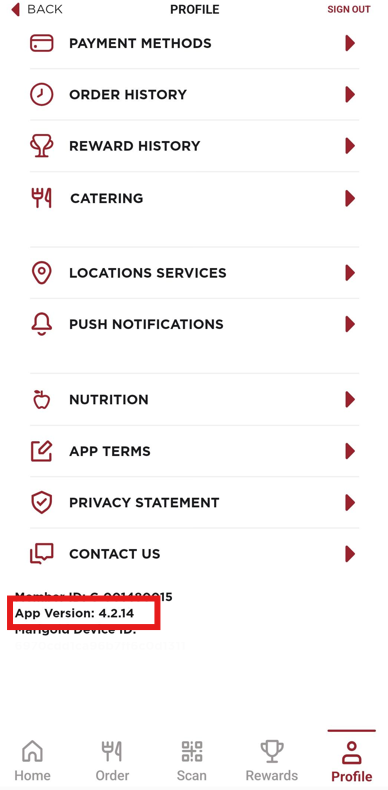
- If you have App Version: 4.2.17, you have the most updated version of our app.
- If this is not listed as App Version: 4.2.17, you do not have the most updated version of our app. Please navigate to your App Store or Google Play Store to update your Chicken Salad Chick app.
Still having trouble?
Please contact our Guest Care Team here. We're happy to help!
Was this article helpful?
That’s Great!
Thank you for your feedback
Sorry! We couldn't be helpful
Thank you for your feedback
Feedback sent
We appreciate your effort and will try to fix the article