If you’re missing a reward you expected to see in your account - such as a giving card reward, a grand opening reward for being one of the first 100 guests, or other reward - don’t worry!
In most cases, logging out of the app and logging back in will resolve the issue.
**Step 1: Open the Chicken Salad Chick App**
- Unlock your mobile device and locate the Chicken Salad Chick app icon. It's the one with the Chicken Salad Chick logo.
**Step 2: Access Your Profile**
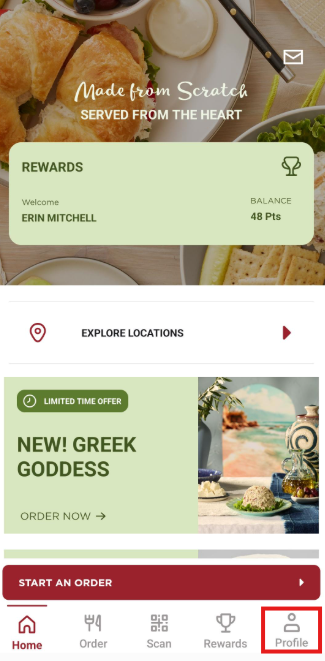
- Once you've opened the app, you'll typically find yourself on the home screen. To log out of your account, tap on the "Profile" option at the bottom right corner of the screen.
**Step 3: Tap "Sign Out"**
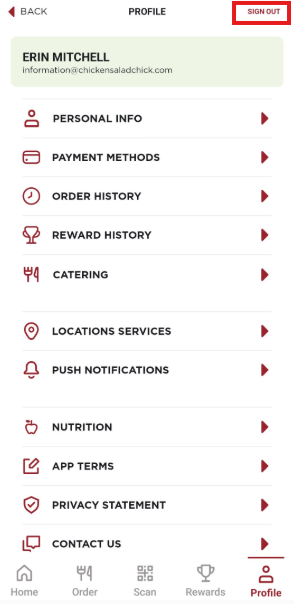
- Within the "Profile" section, look for the "Sign Out" option at the top right corner of the screen.
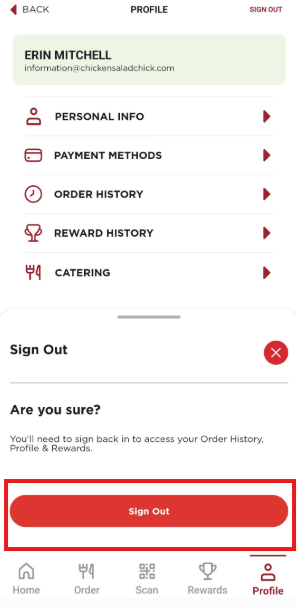
**Step 4: **Confirm that you would like to Sign Out"**
Once you log back in, your account will refresh and any available rewards should appear.
Still missing a Reward?
If you are still missing a reward, or if you are having trouble logging out or back in, please contact our Guest Care Team here. We're happy to help!
Was this article helpful?
That’s Great!
Thank you for your feedback
Sorry! We couldn't be helpful
Thank you for your feedback
Feedback sent
We appreciate your effort and will try to fix the article